Monday, April 27, 2015

Guest Blogger - Lisa Lisson


How to Begin Your North Carolina Genealogy Research
Were your ancestors from North Carolina? Have you ever wondered how to begin looking for your North Carolina roots?

There are many resources for searching out your North Carolina ancestors – far too many to list here.  However, knowing a few basic tips before starting your North Carolina research will help you progress further and quicker.

Location, Location, Location
Know the history of the location where your ancestors lived.

North Carolina is bordered by Virginia, Tennessee, South Carolina and even a small portion of Georgia. The boundaries of North Carolina changed over the course of history. State boundaries and county lines evolved through the years. At times, the boundaries, including the state line, were hotly contested. If your North Carolina ancestor lived close to the Virginia or South Carolina state line, be sure to check the neighboring state’s records for your ancestor.

Today, North Carolina is subdivided into 100 counties, but that has not always been the case. As the state’s population grew and migrated further south and west, new counties were formed and old county lines changed. Western North Carolina counties originally in North Carolina eventually became part of Tennessee. For more information refer to Tennessee Counties Originally in North Carolina.

As a genealogy and family history researcher, you must know your ancestors’ location within their time period. Your ancestor did not necessarily move, but their records may be in a different county due to a change in the county line or the creation of a new county. Knowing the history of the county (counties) where your ancestors lived is crucial for locating their records. For more information on the formation of North Carolina counties refer to North Carolina County Formation.

Location of North Carolina Records
Original Records

The North Carolina genealogy researcher will find the centralization of the state’s records helpful. The State Archives of North Carolina is located in Raleigh and contains records from all 100 counties including former North Carolina counties now in Tennessee. This means you can research an ancestor in multiple North Carolina locations without needing to leave the building. The archives also have a search service or can refer you to a local genealogist if more extensive work is needed.

What if you are not able to get to the State Archives of North Carolina?

Check with the individual counties to see what records (or copies of records) they retained. Remember that many of these records may be available online at FamilySearch.

Online Records

Fortunately for the genealogist, more and more genealogical records and resources are being made available online.  

Know What Records Exist for Your Ancestor’s Location

Birth and death records were not required in North Carolina until 1913. Initially, compliance with this requirement was not met. Delayed certificates filed months or even years after the event can be found.

A loss of county records due to fire or other disaster can hinder your research.  Unfortunately, North Carolina has a number of burned counties in which many county records were lost.  If your ancestor was from a “burned county”, first determine which (if any) records survived the fire. Next, check for possible church records, newspapers or federal records (such as census records and land grant records) for the area. The individual counties’ genealogical or historical societies’ websites can assist you in knowing what records exist.

Best of luck hunting ancestors in the Tarheel state!


Lisa Lisson is a genealogist, blogger and Etsy-prenuer who writes about her never-ending pursuit of ancestors, the “how” of genealogy research, and the importance of sharing genealogy research with our families. Specializing in North Carolina and southern Virginia research, she also provides genealogical research services to clients. In researching her own family history, Lisa discovered a passion for oral history and its role in genealogy research.

When not tracking ancestors through the records, Lisa enjoys spending time with her husband and two “almost” grown children.
You can find Lisa online at LisaLisson.com , Twitter, Pinterest, and her Etsy store Esther’s Place – Heritage Inspired Gifts.

Tuesday, April 21, 2015

How'd She Do That?! : Sharing on Pinterest

Pinterest.com is a website to create virtual bulletin boards. Imagine having a bulletin board for all your favorite things at the touch of your fingers; one dedicated to things you want for your home, one for the stylish wardrobe you hope to have, and one for your family history. WAIT! Did you read that right? Yep, I use Pinterest for my family history and genealogy. Let me show you the steps to become a genealogy pinner!

First, you will need to create a Pinterest account. It is free and doesn't send you spam mail! Go to www.pinterest.com and create an account using an email address or Facebook.  I chose to use my email address.


Once you have created your account, you will be taken to your home page. Follow the instructions in the captions below to create bulletin boards.


On the picture above, you see I have three boards. One entitled "For my house", another called "Genealogy Goodies", and yet another called "My Family History."

Two ways I "pin" things to the boards

When I come across a great blog post or an article online that I want to remember or share, I "pin it" to my "Genealogy Goodies" board.

Sometimes, a favorite blog post will have a "Pin it" button already embedded on the blog and you just hit the button and wa-la!

Let's say you are LOVING this post. You want to "pin it". You would click here:


A box of several images will pop up and you may choose any one of them.


Once you have chosen an image, you will see another pop-up window and you can then choose which board to pin to.


Now you have pinned this article to your virtual bulletin board and for future reference or to share with your friends!

You can even "pin it" from FamilySearch. FamilySearch's Family Tree now has a "Pin it" icon on pictures that have been uploaded there. If you find a picture that you would like to save on a board, you can click "Pin it" and save it accordingly.

Step 1: You found an ancestor


Step 2:


Step 3: Click "Pin it" at the bottom of the image.


Again, you will be brought to a pop-up window and asked which board you wish to pin to.  You choose the board you want and click "Save".

What do I do when there is no "Pin it" button?

You might wonder how people pin an item when there is no "Pin it" button.  Well, they installed a "Pin it" button to their browser. Here's how to do that.  

First, go to your Pinterest page, then click on the little arrow to the left of your name.


When you click "About", you will be directed to a new screen and you will choose "Browser Button" and follow the instructions. 


When you have finished, you will see the Pinterest icon appear in your toolbar at google chrome.


Now you have the opportunity to pin any and everything!

So, if you are at Ancestry.com and see a picture you want to save, you can do so even though they don't have a "Pin it" button embedded in the site.

Like in the example below, I want to save the middle picture of Thomas Foster to my board.


By clicking on that photo, I am taken to another window.  Here I will be able to "Pin it" by pushing the little Pinterest icon in my toolbar like so:


You will then choose the picture by clicking on it and saving it to the appropriate board just like we did in the other examples.

I know this post was a bit long and there were quite a few steps, but I hope that some of you will take the opportunity to start using Pinterest in your family history and genealogy work.

PS...there is so much more to learn on Pinterest. Creating tags and descriptions, following other pinners, and finding pins that might relate to your research are just a few. But, that is for another post!

Want to learn how Facebook is breaking down brick walls in genealogy? Read about it here: http://mykithnkin.blogspot.com/2015/05/howd-she-do-that-using-facebook-to.html

If you have enjoyed reading the stories here at My Kith N Kin, please subscribe by choosing an option in the sidebar to the right. Thank you!

Thursday, April 16, 2015

How'd She Do That?! : Screenshot of a Census


Have you ever wondered how to take a picture of something you are looking at on your computer? You know, the little snapshot of the census record so that you can zoom in on a specific name? Or have you wondered how to add a little arrow to point to something specific?

It's called a screenshot or a screen capture and here's how to do it!

First, you need a screen capture computer service. I really like Jing, but there are several choices out there. You can google "screenshot service" or "screen capture service" and you will have several choices.

Jing can be downloaded for free to your PC or Mac computer. Once you have downloaded the service, you will see a little "sun" appear on the top of your screen.


Since Jing has some great tutorials on how to use the product, I won't go into too much detail. Be sure to watch their videos and learn the capabilities of this tool.

In this case, I want to show you how you can utilize Jing for your genealogy and family history. It is particularly nice when you have a census that you want to zoom in on.

Here is a census as a full page:

Digital image from FamilySearch of 1900 US Federal Census for Harlan, Kentucky

Some of you have no problem seeing the names on the record and others can't really make out what it says. But, if I zoom in and take a screenshot of just the part I am interested in, it will look like this:

Screenshot from FamilySearch of 1900 Federal Census for Harlan, Kentucky
Nice!  

Now, let's say I want to draw your attention to a specific detail on that screenshot. I can add boxes, arrows, or text to the image by using the tools at Jing.


Very nice!

Once you have the image just as you want it, you are able to save, share, or copy it to your computer's clipboard.

Remember to always cite where you got the image. If I use a screenshot of an image from Ancestry.com, I will put a caption at the bottom that says something like "Screenshot of 1880 US Federal Census from Ancestry.com".

I know this still might seem a little confusing, so I encourage you to watch the tutorials at Jing. I think you will really enjoy this tool!

Monday, April 13, 2015

OGS Conference & What I learned

We had a great time in Columbus at the Ohio Genealogical Conference! My friends from Miami County headed down on Wednesday and I met up with them on Friday for the last 2 days.


Me, Sharon Watson, Doug Carey, & Stephanie Winchester
The Miami County Gang
I continue to see the value of attending these great events. Even if you can't go to all of them or if you can't stay all 3 days, or 4 days or whatever, attending even a portion is well worth your time.

I learned some pretty cool things. First, if you plan to leave on Saturday, don't park under a building that is closed on Saturdays. Yeah..that was fun. A big thanks goes out to the nice man who helped me get through the locked building and to my car.

Second, when you park at an underground location, be sure to pay at the designated pay location prior to trying to leave the garage....and make sure you get your ticket back as proof you paid. Shout out to the other nice man who came to the rescue to get me out of the garage!

Now before you think that the only thing I learned were some street smarts, let me leave you with this quick list of fun things I learned from my classes.

* FamilySearch has an app gallery - Found online at FamilySearch. It will give you tried and true apps for genealogists. You can find it https://familysearch.org/apps/ . Search through to see what apps you might be interested in getting.

* Good reads for the Revolutionary War:  "Encyclopedia of the American Revolution""Forgotten Patriots""Devil of a Whipping: The Battle of Cowpens". I attached a link to Amazon on each title for you! Did you know that pensions for the Revolutionary War could be picked up on the 4th of March and September each year? Yep. And, the pension was picked up from a bank. Isn't that interesting!


* BCG (Board of Certified Genealogists) have free webinars every 3rd Tuesday of the month. You can learn how to see these here. They look really good and I can't wait to watch them from here on out.

* If you have ever been interested in becoming a Certified Genealogist, you will want to visit the BCG booth at one of these types of events. They bring examples of how a certification portfolio is to be organized. It really helped me to visualized how I need to organize mine.

* "Mastering Genealogical Proof" by Thomas W. Jones is a must have in any professional genealogist's library. BCG even offers a study group to go chapter by chapter in the book. A second book entitled "Professional Genealogy" by Elizabeth Shown-Mills is also a must have and has a study group as well. (I attached a link to each so you can buy them now!)

* If you had a DNA test by Ancestry.com, you should transfer the data to FamilyTreeDNA.  There are even more ways to use your DNA to break through brick walls by doing so.  The cost of transfer is $39.00, but well worth it!  At the website, you will do an "autosomal transfer".  You can learn more here.

I learned much more, but these are just a few of the things that stuck out!  Perhaps as I learn more about some of these, I will write some blogs about them individually.  Tune in next time!


Tuesday, March 31, 2015

Civil War Soldiers: Just a Click Away

My 8th grade son will be beginning the Civil War chapter in his history class next week. Perfect timing, I thought, April 2015 will be the 150th anniversary of the end of the Civil War.

If  you have a male relative born between about 1820 and 1845, he may have served in the Civil War. Perhaps he was a Yankee or maybe you had a real "Rebel" in the family. Did I say "he?" There were some "she's" fighting too!  

Whether your ancestor was fighting far from home or was a volunteer in the local militia, there is likely a story to tell. Finding that story may only be a "click" away!

Recently, I came across two wonderful internet sites that bring to life the Civil War veteran and thought I would share them here!

16th Ohio Volunteer Infantry website is filled with all sorts of great things.  Pictures, letters, notes, and diaries are just a few. I was particularly drawn to this site because of the enormous amount of information from a genealogical standpoint.
Screenshot from 16th Ohio Volunteer Infantry website

Michael Wood, creator of the site, has been working more than 15 years to make it what it is today.

You will find searchable rosters and even descendency information for many of the soldiers. Though genealogical data is not sourced, Michael has included many names of spouses, children, and important dates and locations for them as well.

The 16th Ohio Volunteer Infantry was made up of soldiers mainly from the counties of Muskingum, Loraine, Union, and Wayne. So if you have ancestors who lived in those areas, you will definitely want to check this out.  

48th Pennsylvania Veteran Volunteer Infantry is a blog dedicated to the soldiers of the 48th. Most men were from Schuylkill County, Pennsylvania. John David Hoptak is the writer and creator of this blog.


Screenshot from 48th PA Veteran Volunteer Infantry blog
Though this blog does not contain genealogical data about the soldiers relatives, John does have a descriptive roll of each soldier (if available) and has broken it down by company. These descriptive rolls include death dates and locations for many of the soldiers. You will also find several pictures of soldiers from the regiment.  

John's particular strength is in his writing. He tells of the daily struggles and events of the 48th and opens your eyes to the life a soldier lived. As a side note, he has included some great reads for those of us Civil War buffs!

These are just two of the hundreds of great Civil War sites that can enrich your family history story. If you are interested in finding out more about your Civil War ancestor, might I suggest you google something like "136th Illinois Infantry history" and see what comes up. Happy Hunting!

Friday, March 20, 2015

Chicken Scratch and Misspellings

Have you ever yelled at your kids for their bad handwriting?  "I can't read this chicken scratch!" you exclaim.

Between bad handwriting, poor spelling, and fuzzy or unclear digital images, records are hard to read. I want to share with you some tricks of the trade I have learned over the years.  I hope they help you overcome this obstacle.

Let's look at some examples:

Screenshot from Ancestry.com, 1880 US Federal Census for Okaw, Shelby county, IL

Okay, let's look at the first name I have indicated with a red arrow.  The last name is Perry and the first name is Mason.  (Perry Mason...ha, ha...funny!)  Look closely at "Perry".  Can you imagine that if you weren't as savvy with cursive writing, you might think it looked like "Pouj" or "Pay".  If an indexer saw the name as "Pay" and indexed it as such, then when you look for "Mason Perry", this census would likely not show up.

Let's look at the second name I marked with an arrow. Fisher is the last name and Thomas is the first name.  "Fisher" could be seen as "Tisher" or "Jisher", maybe even "Foher".  If you are typing in "Thomas Fisher" into your search, you would likely not see anyone with the last name of "Foher" pop up.

Lastly, the third arrow points to "Boly, Jerme A."...or at least that is what it looks like.  The young man named here is actually James A. Rowley, son of Hiram Rowley and Rebecca Underwood.  Now if you look again, you can make out that the last name might have been written as "Roly", which is phonetically correct, just misspelled.

When you are searching Ancestry.com or FamilySearch.org, consider alternate spellings.  If Mason Perry was your ancestor and you couldn't find him in a census, have you tried looking for a Mason "Pay"?  If your ancestor was James Roly, have you considered looking for him under the name of James "Rowley" or "Rolly"?  Changing up the spelling can be one trick to finding your elusive ancestor.

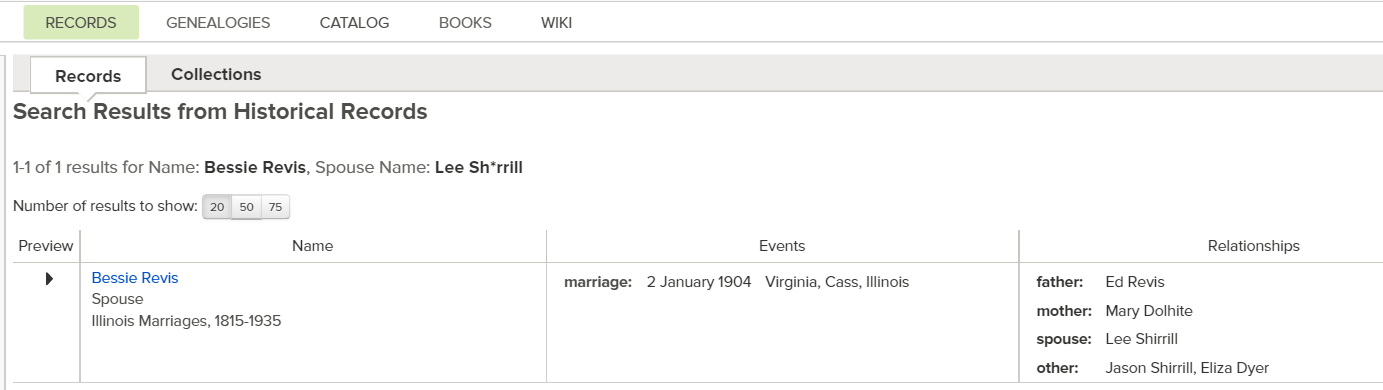
Here's another tip:  if you suspect your targeted ancestor is not popping up in searches because their name is indexed wrong, try using a WILD CARD.  A "wild card" is a phrase we use to indicate using an * in place of a letter or letters.  Let's use Bessie Revis Sherrill as an example.

Bessie Revis was born in about 1885 in Cass County, IL.  Let's assume I know that she married a Mr. Sherrill, but I don't know his first name.  I would also like to find her parents.

If I were to go to FamilySearch.org, my search would look like this:


I typed in her first and last name.  I used the "Any Place" search box by clicking "Any" and added the location.  Be sure to ONLY use a county name and state, don't worry about a city, even if you know it.  I left the year span empty.  I am hoping to find her husband's first name, so in the "Search with a relationship" field, I chose "Spouse" and used the last name of "Sherrill".  Here are the results:


I only got one good match, but it did give me Bessie's husband's first name!  Hooray!  Now, I can go back to FamilySearch and do a search with her husband's first name.  Here is what it would look like:


Here are the results:


I STILL only got one result!!  But, since "Sherrill" could be spelled a million different ways, I am going to go back and use the wild card method with an *.  This is what it would look like:


And the results are:


Ta-da!  There is the marriage record I was hoping to find!  Because Lee's last name was spelled differently, the system did not find it with the original spelling I had used.  Now, I have the names of Bessie's parents AND Lee's parents too!

This wild card method can be used at FamilySearch.org and Ancestry.com as well as many other online sites.  Go and try it!  Maybe you will find the record you've been searching for.  Good Luck!!


Tuesday, March 10, 2015

How To Make a Source Citation For The Challenged

Okay, I don't actually think any of you are "challenged", but when I want to learn something that I think is difficult, I use google and type in something like "basket weaving for dummies" or "html for dummies."

In genealogy, learning how to make a source citation was and is the hardest thing I have ever learned. I have spent countless hours reading and studying the technique.  The GPS (Genealogical Proof Standard) states that citations of sources must "demonstrate the extent of the search and the quality of the sources and allow others to replicate the steps taken to reach the conclusion." ("Genealogical Proof Standard", Board for Certification of Genealogists, website, http://www.bcgcertification.org/resources/standard.html : accessed 9 Mar 2015.)  The first time I read that, I said "huh?"

What is a source citation?  It is when you attach a type of explanation to your information.  Such as, you have stated that John Robert Smith was born on 3 July 1853 in Logan County, Ohio. Where did you get that information?  If you got it from John's death record, then where did you get the death record from?  Your source citation would tell the reader all the information they would need to find the exact record and get the same information.

Why do you need a source citation?  The easy answer is because no one will believe your work is accurate!  Ha, ha!  No, really, because you want others to trust that your information is indeed accurate.

If we were to use the example above and I found a BIRTH RECORD for John which said he was born on 3 Jul 1852, then I could see that your information came from a death record made after the person was dead and I would conclude that my birth date is likely more accurate.  Or, if I never found any record for John's birth date, I would see your source citation and know that the birth date can be seen on his death record that you found at (wherever you found it!).

So how do you write a source citation?  Okay, I am treading on very thin ice.  Here is the thing; there are some of us who are studying and working as professional genealogists and we are required and encouraged to follow the example of Elizabeth Shown-Mills in Evidence Explained.  I do that for my own work. But, I want to write to those of you who are not using ANY source citations at this time and I want to make it very basic.  This should not take the place of you learning the proper method, but help you to begin to learn the process and give you a place to start.

If you were to find a birth date on a tombstone picture at Findagrave, I would suggest that you write something like this for your source citation:  Name of person as it appears on the WEBSITE (not the tombstone), date of birth, cemetery name and place, and write www.findagrave.com.

Susan A. Dunham, date of birth on tombstone picture 15 May 1840, Pleasant Hill Cemetery, New Johnsonville, Tennessee, www.findagrave.com.

If you were to find a birth date using a birth record that you found on FamilySearch, I would suggest you write:  Name of the person just as it is written on the record (even if it is spelled incorrectly), date of birth, the database title (that is like "Ohio Births and Christenings, 1861-1952"), and www.familysearch.org.

Joyce Edwards, born 22 Mar 1901, Ohio Births and Christenings, 1861-1952, www.familysearch.org.

Let's talk personal knowledge.  Personal knowledge is when you didn't have to get a record because you were there when the event happened.  For example, you have written down that your son Tommy was born on 4 Sept 1977 in Piqua, Miami, Ohio.  You can write the source citation as "personal knowledge of the event."

Thomas May, born 21 Nov 1980, personal knowledge of mother Rebecca Taylor May.  

A lot of us use censuses.  They are among the longest of the source citations when done correctly.  I would suggest that you begin by listing which census year you are looking at, where the census was taken, the persons' family number and name, and where you viewed the census.  An example might look like this: 

1940 US Federal Census, Rose Hill, Lee County, Virginia, family 170, Joe Hensley, www.ancestry.com 

It might be helpful to see where you can find that "family number" I mentioned. Here is a picture to show you.


I hope this article will encourage you to start sourcing your information and realize that you don't have to start at a professional level.  Just begin with the most basic information, start the habit, and later you can improve your skills one citation at a time!

Think you might have a family line that is "finished?" Think again! Read here to find out what might be slipping by you: http://mykithnkin.blogspot.com/2015/10/finished-family-line-is-questioned.html